SMARTSUPPLY+ PRODUCT TOURS
See SmartSupply+
in action.
Follow a delayed purchase order from exception review through investigation and the applicable approval requirement.
FEATURED TOUR
Exception to controlled action
Review a delayed purchase order from the first exception signal to the required approval.
PRODUCT VIEWException Cockpit
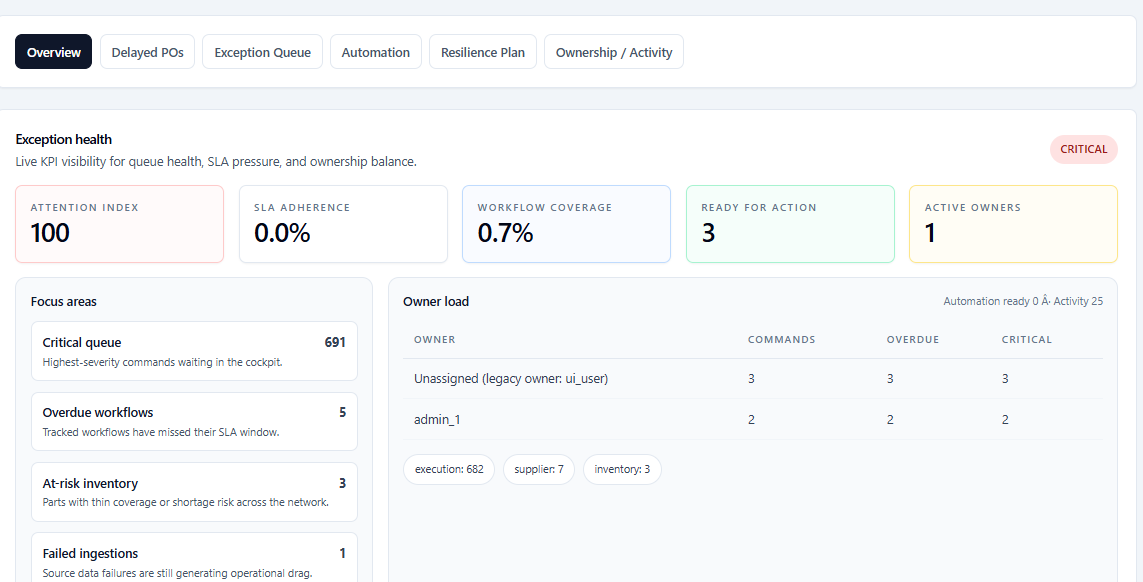
Actual product capture · illustrative data
STEP 01 / 04
See what needs attention.
Review exception health, focus areas and ownership in the Exception Cockpit.
What to look for
Look for Exception Health, Focus Areas and Owner Load.
The tour shows captured application views, not live transactions. Available workflows depend on configuration, permissions and source data.
PROVE IT WITH YOUR DATA
See how the workflow fits your operation.
Bring a planning challenge and explore the relevant SmartSupply+ workflows with our team.